
AI-Assisted Web Application Development
Introduction
A few years ago, if someone told you that you'd have a colleague in your editor who never sleeps, doesn't need coffee, and can write regex for you - you wouldn't believe them. Yet here we are in 2026. AI tools have become part of the developer workflow and it's no longer just hype, but a real tool that can save you hours of work.
In this article, we'll look at how to actually use AI assistants in web application development - not just for generating hello world examples, but in a real everyday workflow. I'll share my experience, show concrete examples, and also tell you where AI fails and what to watch out for.
What AI Assistants Can (and Can't) Do
Before we dive into specific tools, let's clarify what you can realistically expect from AI and where you should remain vigilant.
Where AI Excels
- Generating boilerplate code - components, CRUD operations, configuration
- Refactoring - rewriting code into cleaner form, renaming variables in context
- Writing tests - unit tests, edge cases you wouldn't think of
- Debugging - analyzing error messages, suggesting fixes
- Documentation - JSDoc comments, README files, API documentation
- Learning - explaining unfamiliar code, technologies, concepts
Where AI Still Struggles
- Complex architectural decisions - AI doesn't have the context of your business
- Security - blindly trusting AI-generated code for authentication or validation is risky
- Currency - models have a knowledge cutoff and may suggest outdated approaches
- Specific domain context - your unique tech stack and conventions are unknown to AI
⚠️ Important Rule
AI is an assistant, not an author. Always review generated code, understand it, and don't blindly rely on the output. You are the one responsible for code quality.
Tools Worth Your Attention
Let's look at specific tools you can start using today.
🧠 Claude Code (Anthropic)
Claude Code is a CLI tool from Anthropic that lets you work with AI directly in the terminal and across your entire project. This isn't a chatbot where you copy-paste code snippets - Claude Code sees your entire repository, reads files, searches code, and suggests changes in context.
Why I use it as my main tool:
- Understands the entire project - you don't need to send individual files, it finds what it needs on its own
- Cross-file refactoring - "rename this composable and update all imports"
- Debugging - I paste an error message and Claude Code looks into relevant files on its own
- Architecture planning - "how would you solve XY in Nuxt 3?" with full project context
- Code review - it reviews code and points out weak spots
Practical example - I tell Claude Code what I want and it suggests implementation directly in the project:
# Claude Code works directly with your files
claude "Create a Vue component for form validation with email and debounce"

# Or debugging - just describe the problem
claude "I have a hydration mismatch on the /knowledge page, find the cause"
Claude Code is also available as a VS Code extension and within the Cursor editor, so you can integrate it into your favorite environment.
⚡ Cursor
Cursor is a fork of VS Code with deeply integrated AI. Imagine VS Code where AI is a first-class citizen - not just an extension, but part of the entire editor.
Interesting features:
- Composer - describe a change in natural language and Cursor modifies multiple files at once
- Chat with context - automatically indexes the entire project
- Apply - apply suggested changes with a single click
- Tab completion - inline autocomplete that understands the surrounding code context
Under the hood, Cursor uses various models (including Claude) and combines them with its own project indexing. It's a great choice if you want AI integrated directly into your editor without switching between tools.
🔮 OpenAI Codex
Codex is a cloud-based AI agent from OpenAI that works in a sandboxed environment. Unlike local tools, Codex receives a task, creates its own environment, clones the repository, and works autonomously - writing code, running tests, and preparing a pull request.
How it works:
- You assign a task in natural language directly from ChatGPT or via API
- Codex creates an isolated environment and works in the background
- Upon completion, you get a diff with proposed changes
- Suitable for parallel processing of multiple tasks at once
Where it makes sense:
- Simpler feature requests and bug fixes
- Automatic fixes from the issue tracker
- Tasks where you don't need real-time interaction
It's a slightly different approach than Claude Code or Cursor - instead of real-time collaboration, you assign a task and come back to the result. It works well as a complement to interactive tools.
Tool Comparison
| Feature | Claude Code | Cursor | Codex |
|---|---|---|---|
| Inline autocomplete | ❌ No (but yes in Cursor) | ✅ Excellent | ❌ No |
| Chat / Dialog | ✅ Excellent | ✅ Excellent | ⚠️ Asynchronous |
| Full project context | ✅ Yes | ✅ Yes | ✅ Yes (clones repo) |
| Multifile edits | ✅ Yes | ✅ Composer | ✅ Yes |
| Autonomous work | ⚠️ With confirmation | ⚠️ With confirmation | ✅ Fully autonomous |
| Environment | CLI, VS Code, Cursor | Custom editor | Cloud sandbox |
| Price (monthly) | Various plans | ~20 USD | Part of ChatGPT Pro/Team |
My Workflow with AI
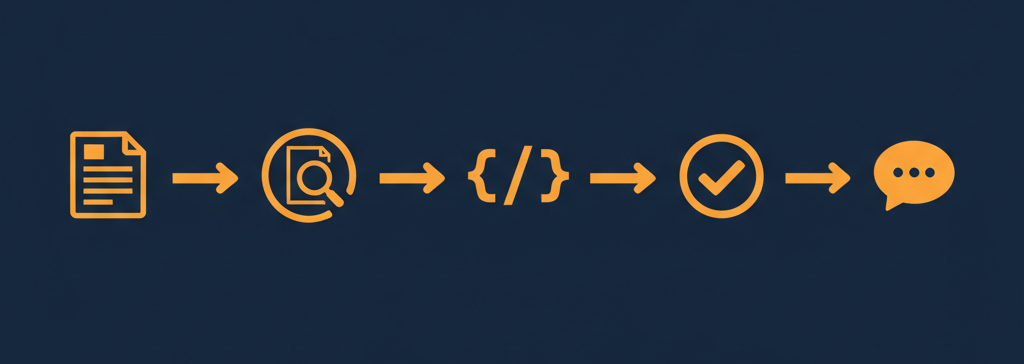
Many people use AI in a "just write this for me" fashion and call it done. Over time, I've developed a structured workflow that gives me much better results. Let's walk through it step by step.
1️⃣ The Plan
Everything starts with a plan. I don't jump straight into code - first I write down what I want to do, what the requirements are, what components will be needed, and how it all fits together. I then pass this plan to AI as context.
For example: "I need to create article filtering by tags. It will be a Vue composable that takes an array of articles and returns a reactive filtered list. The filter is saved to URL query parameters."
2️⃣ Plan Verification
This is the step many people skip - and that's a shame. I let AI review my plan and find the gaps. What did I overlook? What edge cases might occur? Does the architecture make sense?
AI sees things from a different angle and often reveals problems that would only occur to me during implementation. For instance: "What happens when a user enters a tag that doesn't exist? How will this work with SSR? Shouldn't you add debounce to the URL update?"
3️⃣ Implementation with Tests
Only now comes the actual coding. For this I have a custom slash command in Claude Code - I just call /implement with a reference to the plan file and Claude Code takes care of the rest:
/implement plan-name.md
This command ensures that AI doesn't just implement the feature, but also the tests right away:
- Unit tests - testing individual functions and composables
- E2E tests - the entire user flow from A to Z
- Playwright tests - visual and interaction testing via MCP server
No need to manually type or copy context - the slash command loads the plan and knows what to do. Tests are an integral part of implementation, not something to "add later." This gives me confidence that the code works before I even look at it.
4️⃣ Manual Testing and Code Review
This is the step I never skip. I go through the generated code line by line, run the application, and manually test it. I ask myself:
- Does this code make sense?
- Is it readable and maintainable?
- Are the tests actually meaningful, or just there "to exist"?
- Does it work correctly in the browser?
AI can write code that passes tests, but it isn't necessarily good code. Code review is where you bring your expertise into the equation.
5️⃣ Feedback Loop
The final step is feedback. When I find something I don't like - poor naming, unnecessary complexity, a missing edge case - I tell AI and have it fix it. We iterate until I'm satisfied.
"Rename the composable from useFilter to useArticleTagFilter, it's more specific. And add handling for when the tags array is empty."
The entire cycle repeats until the result is what I want. The key takeaway is that I drive the process - AI is the executor, not the decision-maker.
Tips for Effective Work with AI
From my experience, a few rules emerge that will help you get more out of AI.
1️⃣ Be Specific
Instead of "write me a component," say "write me a Vue 3 component with Composition API that displays a list of users with sorting by name and registration date, use TypeScript."
2️⃣ Provide Context
Tell AI what framework you're using, what conventions you follow, what the goal is. The more context, the better the output.
3️⃣ Iterate
The first output doesn't have to be perfect. Say what you want differently - "add error handling", "use a composable instead of a mixin", "simplify it".
4️⃣ Always Review Output
AI can generate code that looks correct but contains subtle bugs. Understand every line you commit.
5️⃣ Don't Be Afraid to Experiment
Try different tools, different approaches. What works for one person might not work for another. Find your sweet spot.
The Future of AI in Development
AI tools are improving at an incredible pace. What's ahead?
- Deeper CI/CD integration - automatic code review, bug detection in PRs
- Autonomous agents - AI that not only suggests solutions but implements and tests them
- Better context understanding - AI that understands the entire project, its history, and business logic
- Personalization - tools that learn your coding style and conventions
I personally believe that AI won't replace developers, but developers who use AI will replace those who don't. It's like any other tool - a hammer won't build a house on its own, but try building without one.
Conclusion
AI-assisted development isn't magic or a threat - it's a tool that can significantly boost your productivity if you use it correctly. The key is to approach AI as a junior colleague - you give it a task, review the output, and bear responsibility for the result.
Start with one tool, learn to use it effectively, and gradually expand your workflow. You don't have to change your entire approach right away - just start with autocomplete or a chatbot for debugging and build from there.
And if you've been avoiding AI so far - now is the right time to start. Not because it's trendy, but because it will genuinely save you time and frustration.
Useful Links
Get in touch - the first consultation is completely free.
Newsletter
Stay in the loop
Get notified about new articles and tips. No spam.
You might also like
Sharing knowledge is a loving expression of care for the community. Let's learn something new together.
Will AI Replace Web Developers?
Can AI build your website? A practical look at what AI can and cannot do in web development in 2026, and when you still need a professional developer.
Read more
VS Code - 10 most useful tips you may not know
Lets take a look at how to make working with VS Code more enjoyable and efficient with these 10 tips.
Read more
What are SPA, SSR, PWA and what are the advantages or disadvantages?
A little bit of historical development of websites to today. Explanation of the terms Single Page Application, Server Side Rendering, Progressive web appgres, differences between them and advantages/disadvantages.
Read more