
Booking System for Your Website - A Guide for Service Businesses
Introduction
Hair salons, massage therapists, medical offices, gyms, restaurants, car repair shops - all these businesses have one thing in common. Customers call to book an appointment. And they call at the worst possible time - when you're mid-haircut, mid-massage, or elbow-deep in an engine.
An online booking system solves this. Customers pick a time slot themselves, whenever it suits them - even at 3 AM in their pajamas. You open your calendar in the morning and see what's ahead. No missed calls, no scribbling in paper diaries.
We'll go through what options you have, what it costs, and what to watch out for so you pick a solution that actually saves you time and brings in customers.
📈 Why Online Booking Increases Your Customer Count
This isn't just about convenience. Online booking directly affects how many customers you get.
24/7 availability. Your phone works nine to five. A booking system works all the time. A lot of people schedule services in the evening, after work, on weekends. If they can't book at that moment, they go elsewhere - to a competitor that has online booking.
Lower barrier. Calling a stranger is uncomfortable for many people (especially younger generations). Clicking a "Book Now" button is painless. Sounds minor, but it genuinely affects how many people reach out.
Fewer forgotten appointments. An automatic reminder the day before cuts no-shows by 30-50%. That's money you'd otherwise throw out the window.
💡 From Practice
Hair salons that switch from phone bookings to an online system typically see a 20-30% increase in bookings within the first three months. The biggest jump is in bookings made outside business hours.
🔧 Types of Booking Systems
Before you start picking a specific tool, it helps to know what you actually need. Booking systems fall into three categories by complexity.

📅 Simple Calendar
Customers see available slots and pick one. No payments, no complications. Enough for a solo operator or small business with a few services. Typically free or a few dollars a month.

🏢 Team System
Multiple employees, each with their own calendar. Service management, pricing, duration. Notifications for customers and staff. For salons, clinics, gyms.

⚙️ Complex Solution
Upfront payments, cancellation policies, loyalty programs, POS integration, reporting. For multi-location restaurants, wellness centers, sports facilities.
Most small businesses get by with the first two categories. If you don't need online payments and have one to three employees, a simple calendar will do just fine.
🛠️ Off-the-Shelf vs Custom Solutions
You have two basic paths - use a ready-made service, or have a custom solution built. Both have their place.
🌐 Third-Party Services
📆 Calendly
Popular with freelancers and consultants. Simple, elegant, excellent Google Calendar integration. Free plan for basic use, paid plans from $8/month.
📋 Acuity Scheduling
Part of the Squarespace ecosystem. Strong customization, intake forms, payment processing. Good for service businesses that need more than a basic calendar.
🕐 SimplyBook.me
Feature-rich with a generous free tier. Supports multiple providers, custom booking pages, and various payment integrations. Popular across Europe.
🍽️ Specialized Systems
Restaurants, hotels, and medical offices often need industry-specific solutions. General booking tools won't handle table management, room inventory, or patient records.
The upside of ready-made services is clear - turn it on and go. The downside is platform dependency, monthly fees, and limited control over how the system looks and behaves.
🔨 Custom Solutions
A custom booking system makes sense when you have specific requirements that off-the-shelf solutions can't cover, or when you want bookings fully integrated into your website without redirecting to a third-party page.
The cost of a custom solution starts around $1,200 for a simple calendar and can exceed $8,000 for a complex system with payments and third-party integrations. The advantage is that you pay once and the system is yours.
If your website runs on a CMS with catalog functionality - like Squirrel CMS, which is built specifically for catalogs and includes a powerful page builder - integrating a booking module is simpler because the foundation (service database, filtering, user roles) is already in place.
🔗 Integration with Other Tools
The booking system itself is just one piece of the puzzle. To truly save you time, you need to connect it with the tools you already use.

📅 Google Calendar
The baseline. Most booking systems sync with Google Calendar so you see work and personal events in one place. Check that sync works both ways - you want manually added events to block slots too.

📧 Email Marketing
With customer emails from bookings, you can send them offers and reminders. Integration with tools like Mailchimp automates this.
🧾 Accounting Systems
If you accept upfront payments, you want invoices generated automatically. Connecting to accounting software saves hours every month.

📍 Google Business
Google lets you add a booking button directly to your business profile in search results. Customers find you and book right away. If your business website is missing essentials, a booking system alone won't be enough.
💳 Upfront Payment - How to Reduce No-Shows
A client books an appointment and doesn't show up. Everyone who provides services knows this pain. Upfront payment or deposits cut this down dramatically.
💰 Full Upfront Payment
Eliminates no-shows almost completely. Good for pricier services (massages, consultations). Can deter new customers who don't know you yet.
🔒 Deposit
A compromise - the customer pays 20-30% upfront, the rest on site. Motivating enough to show up, but not as off-putting as full payment.
💳 Card on File
The customer enters card details when booking, but nothing is charged. If they don't show up without canceling, you charge a fee. Common abroad, less so in some markets.
⚠️ Watch Out for GDPR
If you accept online payments or store payment details, you need your data processing in order. Most ready-made solutions handle this for you, but with a custom system it's your responsibility. Also don't forget clear cancellation terms - the customer must know under what conditions they'll get their money back.
📲 Automatic Reminders
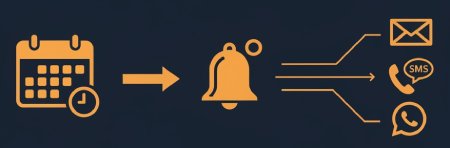
Reminders are one of the most valuable features of a booking system. A simple message - "We're expecting you tomorrow at 2 PM at Salon XY" - reduces forgotten appointments by tens of percent.
Email reminders are the baseline and usually included even in free plans. Send them 24 hours before - enough time for the customer to reconsider and cancel if needed, but not so early they forget again.
SMS reminders have higher effectiveness than email because almost everyone reads their texts. They cost $0.02-0.05 per message, but when one no-show costs you $20+ in lost time, it's an investment that pays for itself many times over.
Some systems also offer reminders via WhatsApp - higher open rates than SMS, but setup is more involved and not all customers use WhatsApp.
🔍 What to Watch Out For
Picking the wrong booking system can cost you more time than it saves. Here's what to ask before you decide.
- Mobile display - more than half of bookings come from mobile. If your booking form doesn't work or is cluttered on a phone, you're losing customers
- Speed - every second spent waiting for the calendar to load reduces the chance a customer completes the booking. Test it yourself on a slow connection - try PageSpeed Insights
- Language - international tools sometimes lack your local language or have awkward translations. For local customers, this matters
- Cancellation and rescheduling - customers should be able to reschedule or cancel on their own. Otherwise they'll call you, and you'll be doing what the system was supposed to eliminate
- Integration with your website - find out whether the system can be embedded directly into your page (embed/iframe) or redirects customers to a third-party domain. Redirects reduce trust
- Data export - if you want to switch systems later, you need to get your data out. Some platforms don't make this easy
💰 What It Costs
The price range is huge, but it breaks down fairly clearly.
| Solution | Monthly Cost | Best For |
|---|---|---|
| Calendly Free / SimplyBook.me Free | $0 | Solo operator, basic needs |
| Acuity / SimplyBook.me Paid | $8-30/month | Small business, team of 2-5 |
| Calendly Pro / Full-featured plans | $15-60/month | Businesses with payments & integrations |
| Custom solution (simple) | $1,200-2,500 one-time | Specific requirements |
| Custom solution (complex) | $4,000-12,000+ one-time | Large businesses, multiple locations |
With ready-made services, expect the price to grow with team size and features. What starts as "free" can grow to significant monthly costs within a year. With a custom solution, you pay more upfront but then have minimal operating costs - just hosting and occasional maintenance.
Conclusion
A booking system isn't a luxury - for a service business, it's a fundamental tool that saves time and brings in customers. If you've been running on phone calls and paper diaries, try starting with a free plan from Calendly or SimplyBook.me. You can set it up in an afternoon and test it in practice.
If you find a simple system isn't enough, consider a custom solution integrated directly into your website. It costs more upfront but pays off long-term - you have full control, no monthly fees, and bookings feel like a natural part of your website rather than a foreign element.
Whatever you choose, start now. Every day without online booking is a day customers call, you don't pick up, and they go elsewhere.
Useful Links
- Calendly - simple scheduling tool for freelancers and consultants
- SimplyBook.me - feature-rich booking system with a generous free tier
- Acuity Scheduling - part of Squarespace, great for service businesses
- Google Business Profile - add a booking button to your Google search listing
- PageSpeed Insights - test your website speed including the booking system
Get in touch - the first consultation is completely free.
Newsletter
Stay in the loop
Get notified about new articles and tips. No spam.
You might also like
Sharing knowledge is a loving expression of care for the community. Let's learn something new together.

What Should a Business Website Contain in 2026
Complete checklist of elements every business website needs. From contact details to SEO and legal requirements.
Read more
How much does a website cost in 2026 - complete pricing guide
Real prices for websites, e-shops and web applications in 2026. What affects the price, hidden costs and how to compare quotes.
Read more
GDPR on Your Website - What You Must Comply With in 2026
A practical GDPR checklist for website owners. Cookies, forms, privacy policy, and common mistakes to avoid.
Read more